
🌐 Language: English | 中文版 → 📖 Read Online → — Sidebar nav, dark mode & full-text search. Better than raw GitHub.
Hook System: 20 Event Types, Full Lifecycle Interception
Source files:
utils/hooks.ts(5,023 lines),utils/hooks/directory,hooks/top-level (17,931 lines)
TL;DR
Claude Code has a 20-event hook system that lets users and plugins intercept nearly every action — from tool execution to session lifecycle to permission decisions. Hooks can approve, deny, modify inputs, inject context, or stop the entire session. The main implementation file (hooks.ts) is 5,023 lines — larger than most entire applications.
1. The 20 Hook Events

Most Important Hook: PreToolUse
PreToolUse fires before every tool execution. It can:
| Action | JSON Output | Effect |
|---|---|---|
| Allow | { "permissionDecision": "allow" } | Skip permission prompt, auto-approve |
| Deny | { "permissionDecision": "deny" } | Block the tool, return error to model |
| Ask | { "permissionDecision": "ask" } | Force permission prompt |
| Modify input | { "updatedInput": {...} } | Change tool arguments before execution |
| Stop session | { "continue": false } | Halt the entire agent loop |
2. Hook Execution Architecture
Hook Types
Hooks can be implemented in three ways:
// 源码位置: src/utils/hooks.ts:45-55
// 1. Command hooks — shell scripts
{ "type": "command", "command": "python validate.py" }

// 2. HTTP hooks — webhook endpoints
{ "type": "http", "url": "https://api.example.com/hook" }

// 3. Agent hooks — Claude sub-agents as hooks
{ "type": "agent", "agent": "security-reviewer" }

// 4. Function hooks — in-process JavaScript (SDK only)
{ "type": "function", "callback": async (input) => {...} }Execution Flow
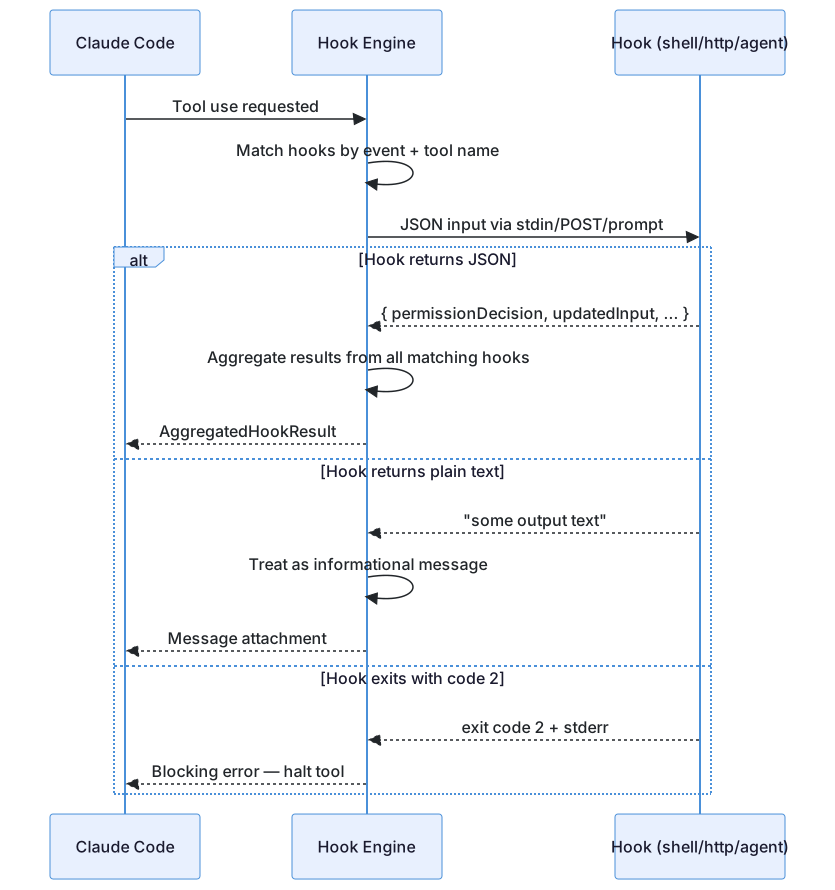
Exit Code Convention
| Exit Code | Meaning |
|---|---|
| 0 | Success — proceed normally |
| 1 | Non-blocking error — log and continue |
| 2 | Blocking error — stop the tool |
| Other | Treated as non-blocking error |
3. Hook Matching
Hooks declare which events and tools they intercept:
{
  "hooks": {
    "PreToolUse": [
      {
        "matcher": "Bash(git *)",
        "command": "python validate_git.py"
      },
      {
        "matcher": "FileWrite",
        "command": "node check_readonly.js"
      }
    ]
  }
}The matcher supports:
- Tool name only:
"Bash"— matches all Bash commands - Tool + pattern:
"Bash(git *)"— matches Bash commands starting withgit - Wildcard:
"*"— matches all tools
Permission Matcher Pipeline
// 源码位置: src/Tool.ts:180-185
// Each tool implements preparePermissionMatcher()
// This creates a closure that tests patterns against tool input
tool.preparePermissionMatcher(input)
// Returns: (pattern: string) => boolean
// e.g., for Bash: checks if command matches "git *"4. Hook JSON Protocol
Hooks communicate via a structured JSON protocol:
Input (stdin / POST body)
{
  "session_id": "uuid",
  "transcript_path": "/path/to/transcript.json",
  "cwd": "/project",
  "tool_name": "Bash",
  "tool_input": { "command": "git push" },
  "permission_mode": "default",
  "agent_id": "optional-agent-id"
}Output (stdout / response body)
{
  "continue": true,
  "decision": "approve",
  "reason": "Git operations are safe",
  "systemMessage": "Optional message to inject",
  "hookSpecificOutput": {
    "hookEventName": "PreToolUse",
    "permissionDecision": "allow",
    "updatedInput": { "command": "git push --no-verify" },
    "additionalContext": "Note: --no-verify was added"
  }
}The output schema is validated with Zod (hookJSONOutputSchema). Invalid JSON is treated as plain text.
5. Workspace Trust Security
A critical security mechanism prevents hooks from running in untrusted workspaces:
// 源码位置: src/utils/hooks.ts:4850-4860
export function shouldSkipHookDueToTrust(): boolean {
  const isInteractive = !getIsNonInteractiveSession()
  if (!isInteractive) return false  // SDK mode: trust is implicit

  // ALL hooks require workspace trust in interactive mode
  return !checkHasTrustDialogAccepted()
}This prevents a malicious .claude/settings.json in a cloned repo from executing arbitrary commands when a user opens the project.
6. Async Hook Execution
Hooks can run asynchronously in the background:
// 源码位置: src/utils/hooks.ts:4920-4935
// AsyncHookJSONOutput declares the hook wants background execution
{ "async": true, "asyncRewake": true }

// The hook is registered and continues running
registerPendingAsyncHook({
  processId, hookId, shellCommand, ...
})

// When it completes, it can re-wake the model
// via task-notification messageasyncRewake hooks can inject results back into the conversation after completion — even if the model has moved on to other tasks.
7. Hook Aggregation
When multiple hooks match the same event, their results are aggregated:
// 源码位置: src/utils/hooks.ts:4980-4995
// Aggregation rules:
// - Any "deny" → deny (most restrictive wins)
// - Any "blocking" → stop
// - Multiple "additionalContext" → concatenated
// - Multiple "updatedInput" → last one wins
// - "preventContinuation" → any true stops the sessionThis means a plugin's security hook can block an operation even if another plugin's hook approved it.
Transferable Design Patterns
The following patterns can be directly applied to other agentic systems or CLI tools.
Pattern 1: Exit Code as Control Flow
Using exit codes (0/1/2) for success/warn/block is simple, universal, and works across any language — Python, Bash, Node, Go. No SDK needed.
Pattern 2: JSON-or-Text Output
Hooks can return either structured JSON or plain text. JSON gets validated and parsed into decisions; plain text becomes an informational message. This makes simple hooks trivial (echo a message) while allowing sophisticated hooks to control permissions.
Pattern 3: Matcher Closures
The preparePermissionMatcher() pattern pre-compiles the matching logic once, then calls the closure per pattern. This avoids re-parsing tool inputs for every hook rule.
Summary
| Aspect | Detail |
|---|---|
| Total code | 5,023 lines in hooks.ts + 17,931 lines in hooks/ directory |
| Event types | 20 lifecycle events |
| Hook types | Command (shell), HTTP (webhook), Agent (sub-agent), Function (SDK) |
| Key hook | PreToolUse — can approve/deny/modify any tool call |
| Communication | JSON via stdin/stdout, validated with Zod |
| Security | Workspace trust required, managed hooks only option |
| Async | Background execution with re-wake capability |
| Aggregation | Most restrictive wins (deny > allow) |
Previous: ← 04 — Plugin SystemNext: → 06 — Bash Execution Engine