
06 — Bash Execution Engine: Sandboxes, Pipelines & Process Lifecycle
🌐 Language: English | 中文版 → 📖 Read Online → — Sidebar nav, dark mode & full-text search. Better than raw GitHub.
Scope:
tools/BashTool/(18 files, ~580KB),utils/Shell.ts,utils/ShellCommand.ts,utils/bash/(15 files, ~430KB),utils/sandbox/(2 files, ~37KB),utils/shell/(10 files, ~114KB)One-liner: How Claude Code safely executes arbitrary shell commands — from parsing
ls && rm -rf /to OS-level sandboxing — without losing sleep.
Architecture Overview

1. BashTool: The Outer Shell (Pun Intended)
The entry point is BashTool.tsx — a 1144-line tool definition built with the standard buildTool() pattern. Its input schema is deceptively simple:
// 源码位置: src/tools/BashTool/BashTool.tsx:45-54
z.strictObject({
  command: z.string(),
  timeout: semanticNumber(z.number().optional()),
  description: z.string().optional(),
  run_in_background: semanticBoolean(z.boolean().optional()),
  dangerouslyDisableSandbox: semanticBoolean(z.boolean().optional()),
  _simulatedSedEdit: z.object({...}).optional()  // HIDDEN from model
})The Hidden _simulatedSedEdit Field
This is a security-critical design: _simulatedSedEdit is always omitted from the model-facing schema. It's set internally by the permission dialog after a user approves a sed edit preview. If exposed, the model could bypass permission checks by pairing an innocuous command with an arbitrary file write.
Command Classification
Before any command runs, BashTool classifies it for UI purposes:
// Search commands → collapsible display
const BASH_SEARCH_COMMANDS = new Set(['find', 'grep', 'rg', 'ag', ...])

// Read commands → collapsible display
const BASH_READ_COMMANDS = new Set(['cat', 'head', 'tail', 'jq', 'awk', ...])

// Semantic-neutral → skipped in classification
const BASH_SEMANTIC_NEUTRAL_COMMANDS = new Set(['echo', 'printf', 'true', ...])

// Silent commands → show "Done" instead of "(No output)"
const BASH_SILENT_COMMANDS = new Set(['mv', 'cp', 'rm', 'mkdir', ...])For compound commands (ls && echo "---" && ls dir2), all parts must be search/read for the whole command to be collapsible. Semantic-neutral commands are transparent.
2. The runShellCommand() Generator
The heart of execution is an AsyncGenerator — a design that elegantly unifies progress reporting with command completion:
// 源码位置: src/tools/BashTool/BashTool.tsx:200-280
async function* runShellCommand({
  input, abortController, setAppState, ...
}): AsyncGenerator<ProgressUpdate, ExecResult, void> {

  // 1. Determine if auto-backgrounding is allowed
  const shouldAutoBackground = !isBackgroundTasksDisabled
    && isAutobackgroundingAllowed(command)

  // 2. Execute via Shell.exec()
  const shellCommand = await exec(command, signal, 'bash', {
    timeout: timeoutMs,
    onProgress(lastLines, allLines, totalLines, totalBytes) {
      // Wake the generator to yield progress
      resolveProgress?.()
    },
    shouldUseSandbox: shouldUseSandbox(input),
    shouldAutoBackground
  })

  // 3. Wait for initial threshold (2s) before showing progress
  const initialResult = await Promise.race([
    resultPromise,
    new Promise(r => setTimeout(r, PROGRESS_THRESHOLD_MS))
  ])
  if (initialResult !== null) return initialResult  // Fast command

  // 4. Progress loop driven by shared poller
  TaskOutput.startPolling(shellCommand.taskOutput.taskId)
  while (true) {
    const result = await Promise.race([resultPromise, progressSignal])
    if (result !== null) return result
    if (backgroundShellId) return backgroundResult
    yield { type: 'progress', output, elapsedTimeSeconds, ... }
  }
}The Three Backgrounding Paths
| Path | Trigger | Who Decides |
|---|---|---|
| Explicit | run_in_background: true | The model |
| Timeout | Command exceeds default timeout | shellCommand.onTimeout() |
| Assistant-mode | Blocking > 15s in main agent | setTimeout() with ASSISTANT_BLOCKING_BUDGET_MS |
| User | Ctrl+B during execution | registerForeground() → background() |
The sleep command is specifically blocked from auto-backgrounding — it runs in foreground unless explicitly backgrounded.
3. Shell Execution Layer (Shell.ts)
Shell Discovery
Claude Code is opinionated about which shells it supports:
// 源码位置: src/utils/Shell.ts:30-50
export async function findSuitableShell(): Promise<string> {
  // 1. Check CLAUDE_CODE_SHELL override (must be bash or zsh)
  // 2. Check $SHELL (must be bash or zsh)
  // 3. Probe: which zsh, which bash
  // 4. Search fallback paths: /bin, /usr/bin, /usr/local/bin, /opt/homebrew/bin
  // 5. Order by user preference (SHELL=bash → bash first)
}Only bash and zsh are supported. Fish, dash, csh — all rejected. The comment is blunt: "if we ever want to add support for new shells we'll need to update our Bash tool parsing."
Process Spawning: File Mode vs. Pipe Mode
A critical architectural decision drives I/O performance:
File Mode (default for bash commands):
// Both stdout AND stderr go to the SAME file fd
const outputHandle = await open(taskOutput.path,
  process.platform === 'win32' ? 'w' :
    O_WRONLY | O_CREAT | O_APPEND | O_NOFOLLOW  // SECURITY: anti-symlink
)

spawn(shell, args, {
  stdio: ['pipe', outputHandle.fd, outputHandle.fd],  // merged fd!
  detached: true,
  windowsHide: true
})This means stderr is interleaved with stdout chronologically — no separate stderr handling. The code comments explain the O_APPEND atomicity guarantee on POSIX ("seek-to-end + write") and the Windows workaround ('w' mode because 'a' strips FILE_WRITE_DATA, causing MSYS2/Cygwin to silently discard all output).
Pipe Mode (for hooks/callbacks):
spawn(shell, args, {
  stdio: ['pipe', 'pipe', 'pipe']
})
// StreamWrapper instances funnel data through TaskOutputCWD Tracking
Each command ends with pwd -P >| /tmp/claude-XXXX-cwd. After the child exits, a synchronous readFileSync updates the CWD:
void shellCommand.result.then(async result => {
  if (!preventCwdChanges && !result.backgroundTaskId) {
    let newCwd = readFileSync(cwdFilePath, 'utf8').trim()
    if (newCwd.normalize('NFC') !== cwd) {  // Unicode normalization!
      setCwd(newCwd, cwd)
      invalidateSessionEnvCache()
      void onCwdChangedForHooks(cwd, newCwd)
    }
  }
})The NFC normalization handles macOS APFS which stores paths as NFD — without it, Unicode paths would falsely trigger a "changed" event on every command.
4. ShellCommand: The Process Wrapper
ShellCommand.ts wraps each child_process.spawn() with lifecycle management:

The Size Watchdog
Background tasks write directly to a file fd with no JS involvement. A stuck append loop once filled 768GB of disk. The fix:
// 源码位置: src/utils/ShellCommand.ts:310-325
#startSizeWatchdog(): void {
  this.#sizeWatchdog = setInterval(() => {
    void stat(this.taskOutput.path).then(s => {
      if (s.size > this.#maxOutputBytes && this.#status === 'backgrounded') {
        this.#killedForSize = true
        this.#doKill(SIGKILL)
      }
    })
  }, SIZE_WATCHDOG_INTERVAL_MS)  // 5 seconds
}Why exit Not close
The code uses 'exit' instead of 'close' to detect child termination:
closewaits for stdio to close, which includes grandchild processes that inherit file descriptors (e.g.sleep 30 &).exitfires when the shell itself exits, returning control immediately.
Process termination uses tree-kill with SIGKILL — no gentle SIGTERM grace period. The entire process tree gets killed.
5. Bash Provider: The Command Assembly Line
bashProvider.ts builds the actual command string that gets passed to the shell:
source /tmp/snapshot.sh 2>/dev/null || true
&& eval '<quoted-user-command>'
&& pwd -P >| /tmp/claude-XXXX-cwdShell Snapshot
Before the first command, createAndSaveSnapshot() captures the user's shell environment (PATH, aliases, functions) into a temp file. Subsequent commands source this snapshot instead of running full login shell initialization (-l flag is skipped).
If the snapshot file vanishes mid-session (tmpdir cleanup), the provider falls back to -l mode automatically:
if (snapshotFilePath) {
  try { await access(snapshotFilePath) }
  catch { snapshotFilePath = undefined }  // Fallback to login shell
}ExtGlob Security
Extended glob patterns (bash extglob, zsh EXTENDED_GLOB) are disabled before every command:
shopt -u extglob 2>/dev/null || true   # bash
setopt NO_EXTENDED_GLOB 2>/dev/null # zshWhy? Malicious filenames containing glob patterns could expand after security validation but before execution.
The eval Wrapper
User commands are wrapped in eval '<command>' to enable a second parsing pass where aliases (loaded from the snapshot) are available for expansion.
6. OS-Level Sandboxing
sandbox-adapter.ts (986 lines) bridges Claude Code's settings system with @anthropic-ai/sandbox-runtime:
Platform Support
| Platform | Technology | Notes |
|---|---|---|
| macOS | sandbox-exec (seatbelt) | Profile-based, glob-aware |
| Linux | bubblewrap (bwrap) + seccomp | Namespace isolation, no glob support |
| WSL2 | bubblewrap | Supported since WSL2 |
| WSL1 | ❌ | Not supported |
| Windows | ❌ | Not supported (PowerShell sandboxing uses different path) |
Config Conversion
Settings are converted to SandboxRuntimeConfig:
// 源码位置: src/utils/sandbox/sandbox-adapter.ts:120-160
function convertToSandboxRuntimeConfig(settings): SandboxRuntimeConfig {
  // 1. Extract network domains from WebFetch permission rules
  // 2. Extract filesystem paths from Edit/Read rules
  // 3. Always deny writes to settings.json (sandbox escape prevention!)
  // 4. Always deny writes to .claude/skills (same privilege as commands)
  // 5. Block bare-git-repo attack vectors (HEAD, objects, refs, hooks, config)
  // 6. Detect git worktrees → allow writes to main repo
  // 7. Include --add-dir directories in allowWrite
  // 8. Configure ripgrep path for sandbox-internal grep
}Security: Settings File Protection
The sandbox unconditionally denies writes to settings files:
const settingsPaths = SETTING_SOURCES.map(source =>
  getSettingsFilePathForSource(source)
).filter(p => p !== undefined)
denyWrite.push(...settingsPaths)
denyWrite.push(getManagedSettingsDropInDir())This prevents a sandboxed command from modifying its own sandbox rules — a classic sandbox escape vector.
The Bare Git Repo Attack
A fascinating security measure blocks an attack where a sandboxed process plants files (HEAD, objects/, refs/) to make the working directory look like a bare git repo. When Claude's unsandboxed git later runs, is_git_directory() returns true, and a malicious config with core.fsmonitor escapes the sandbox:
const bareGitRepoFiles = ['HEAD', 'objects', 'refs', 'hooks', 'config']
for (const gitFile of bareGitRepoFiles) {
  const p = resolve(dir, gitFile)
  try {
    statSync(p)        // File exists → deny writes (ro-bind)
    denyWrite.push(p)
  } catch {
    bareGitRepoScrubPaths.push(p)  // Doesn't exist → scrub after command
  }
}Post-command, scrubBareGitRepoFiles() removes any planted files before unsandboxed git can see them.
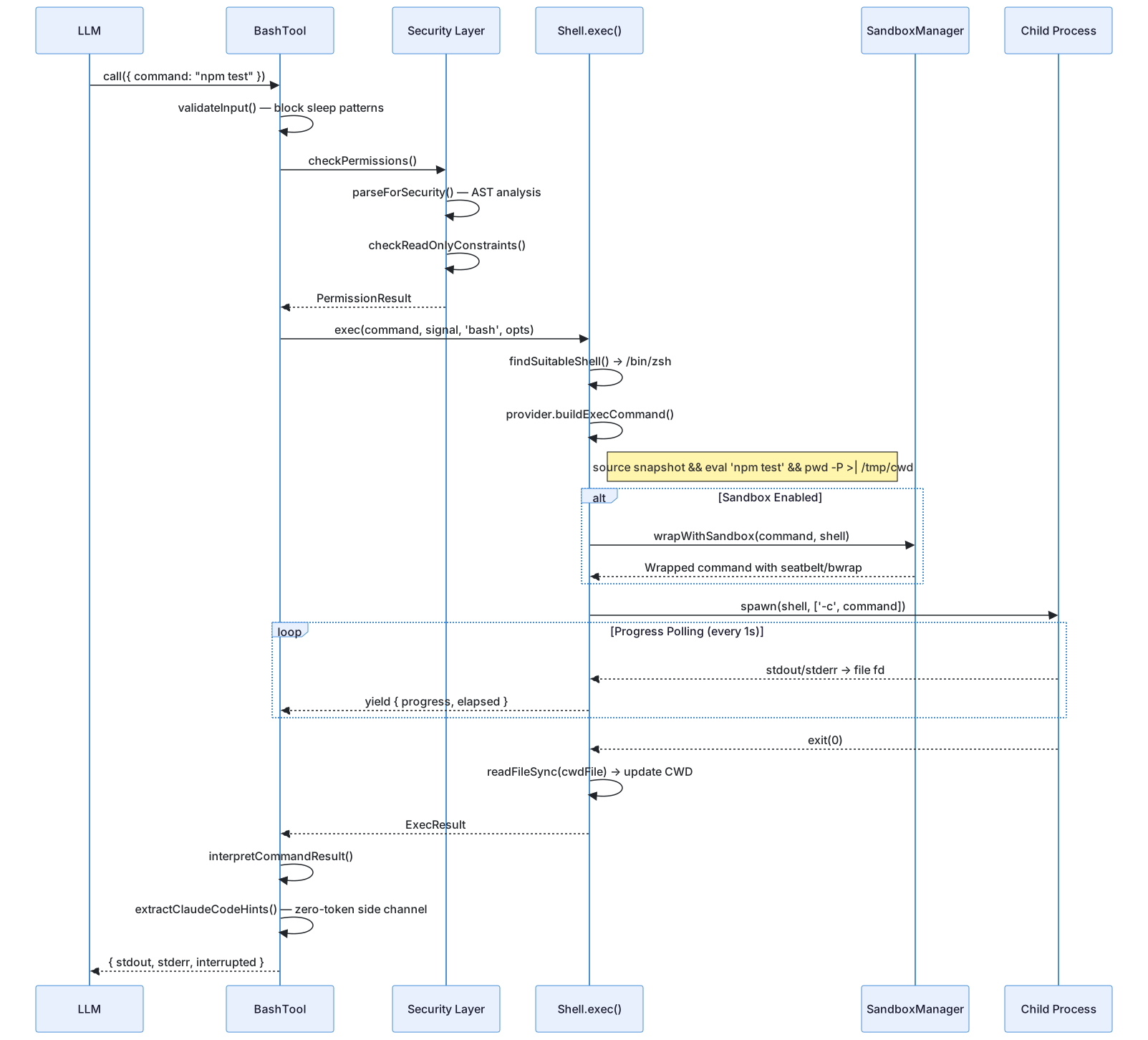
7. Complete Execution Flow
Transferable Design Patterns
The following patterns can be directly applied to other CLI tools or process orchestration systems.
Pattern 1: Merge stdout and stderr into a Single fd
Scenario: Concurrent writes to separate stdout/stderr pipes arrive out of order. Practice: Piping both to the same file descriptor with O_APPEND ensures chronological interleaving without tearing. Claude Code application: spawn(shell, args, { stdio: ['pipe', outputHandle.fd, outputHandle.fd] }).
Pattern 2: Zero-Token Side Channel
Scenario: CLI tools need to communicate metadata (hints, plugin suggestions) without inflating the LLM's context window. Practice: Emit structured tags to stderr, scan and strip them before passing output to the model. Claude Code application: <claude-code-hint /> tags in stderr are extracted by extractClaudeCodeHints() then stripped — the model never sees them.
const extracted = extractClaudeCodeHints(strippedStdout, input.command)
strippedStdout = extracted.stripped  // Model sees clean output
if (isMainThread && extracted.hints.length > 0) {
  for (const hint of extracted.hints) maybeRecordPluginHint(hint)
}Pattern 3: AsyncGenerator for Progress Reporting
Scenario: Long-running subprocess needs to report incremental progress while still delivering a final result. Practice: Use an AsyncGenerator — yield produces progress updates, return delivers the final result. The consumer uses Promise.race([resultPromise, progressSignal]) to handle both in a single await. Claude Code application: runShellCommand() yields progress every 1s while the command runs, then returns ExecResult on completion.
Summary
| Component | Lines | Role |
|---|---|---|
BashTool.tsx | 1,144 | Tool definition, input/output schema, classification |
bashPermissions.ts | ~2,500 | Permission matching with wildcard patterns |
bashSecurity.ts | ~2,600 | Command security classification |
readOnlyValidation.ts | ~1,700 | Read-only constraint checking |
pathValidation.ts | ~1,100 | Path traversal and escape detection |
Shell.ts | 475 | Shell discovery, process spawning, CWD tracking |
ShellCommand.ts | 466 | Process lifecycle, backgrounding, timeouts |
sandbox-adapter.ts | 986 | Settings conversion, OS sandbox orchestration |
bashProvider.ts | 256 | Command assembly, snapshots, eval wrapping |
bash/ parsers | ~7,000+ | AST parsing, heredoc, quoting, pipe handling |
The Bash execution engine is Claude Code's most security-sensitive subsystem. It demonstrates a defense-in-depth approach: application-level command parsing → permission rules → sandbox wrapping → OS-level kernel enforcement. Each layer independently prevents different classes of attacks, and the system degrades gracefully when individual layers are unavailable.
Next: 07 — Permission Pipeline →
Previous: ← 05 — Hook System