
07 — Permission Pipeline: Defense-in-Depth from Rules to Kernel
🌐 Language: English | 中文版 → 📖 Read Online → — Sidebar nav, dark mode & full-text search. Better than raw GitHub.
Scope:
utils/permissions/(24 files, ~320KB),utils/settings/(17 files, ~135KB),utils/sandbox/(2 files, ~37KB)One-liner: How Claude Code decides whether a tool call lives or dies — through a seven-step gauntlet of rules, classifiers, hooks, and OS-level sandbox enforcement.
Architecture Overview

1. The Seven-Step Gauntlet
The core function hasPermissionsToUseToolInner() implements a strictly ordered permission evaluation pipeline. Each step can short-circuit the entire chain:
Step 1a: Tool-Level Deny Rules
// 源码位置: src/utils/permissions/permissions.ts:85-90
const denyRule = getDenyRuleForTool(appState.toolPermissionContext, tool)
if (denyRule) return { behavior: 'deny', ... }Hard deny — no override possible. Sourced from: userSettings, projectSettings, localSettings, policySettings, flagSettings, cliArg, command, session.
Step 1b: Tool-Level Ask Rules
const askRule = getAskRuleForTool(appState.toolPermissionContext, tool)
if (askRule) {
  // Exception: sandbox can auto-allow Bash commands
  const canSandboxAutoAllow =
    tool.name === 'Bash' &&
    SandboxManager.isSandboxingEnabled() &&
    SandboxManager.isAutoAllowBashIfSandboxedEnabled() &&
    shouldUseSandbox(input)
  if (!canSandboxAutoAllow) return { behavior: 'ask', ... }
}Critical design: when sandbox is enabled with auto-allow, sandboxed Bash commands skip the ask rule. Non-sandboxed commands (excluded commands, dangerouslyDisableSandbox) still respect it.
Step 1c: Tool-Specific Permission Check
const parsedInput = tool.inputSchema.parse(input)
toolPermissionResult = await tool.checkPermissions(parsedInput, context)Each tool implements its own checkPermissions(). BashTool inspects subcommands, EditTool checks file paths, WebFetch validates domains.
Step 1d–1g: Safety Guardrails
| Step | Check | Immune to Bypass? |
|---|---|---|
| 1d | Tool implementation denied | ✅ Yes |
| 1e | requiresUserInteraction() returns true | ✅ Yes |
| 1f | Content-specific ask rules (e.g., Bash(npm publish:*)) | ✅ Yes |
| 1g | Safety checks (.git/, .claude/, .vscode/, shell configs) | ✅ Yes |
These four checks are bypass-immune — they fire even in bypassPermissions mode.
Step 2a: Bypass Permissions Mode
const shouldBypassPermissions =
  mode === 'bypassPermissions' ||
  (mode === 'plan' && isBypassPermissionsModeAvailable)
if (shouldBypassPermissions) return { behavior: 'allow', ... }Step 2b: Always-Allow Rules
const alwaysAllowedRule = toolAlwaysAllowedRule(context, tool)
if (alwaysAllowedRule) return { behavior: 'allow', ... }Supports MCP server-level matching: rule mcp__server1 matches mcp__server1__tool1.
Step 3: Passthrough → Ask
const result = toolPermissionResult.behavior === 'passthrough'
  ? { ...toolPermissionResult, behavior: 'ask' }
: toolPermissionResultIf nothing decided, the default is to ask the user.
2. Permission Modes
Six modes control how ask decisions are resolved:

Mode Behavior Matrix
| Mode | ask becomes | Safety checks | Notes |
|---|---|---|---|
default | Prompt user | Prompt | Standard interactive mode |
plan | Prompt user | Prompt | Stashes pre-plan mode for restoration |
acceptEdits | Allow (file edits only) | Prompt | Non-edit tools still prompt |
bypassPermissions | Allow all | Still prompt | Can be disabled by GrowthBook gate or settings |
dontAsk | Deny | Prompt | Silent rejection, model sees denial message |
auto | Classifier decides | Prompt | 2-stage XML classifier, GrowthBook-gated |
Mode Transitions
transitionPermissionMode() centralizes all side-effects:
- Entering auto mode: Strips dangerous permissions (Bash(), python:, Agent allowlists) that would bypass the classifier
- Leaving auto mode: Restores stripped permissions
- Entering plan mode: Saves pre-plan mode for restoration
- Leaving plan mode: Restores previous mode
3. Rule Sources and Priority
Rules are loaded from 7 sources, evaluated in a flat list:
// 源码位置: src/utils/permissions/permissionsLoader.ts:12-20
const PERMISSION_RULE_SOURCES = [
  ...SETTING_SOURCES,  // userSettings, projectSettings, localSettings,
                       // policySettings, flagSettings
  'cliArg',
  'command',
  'session',
]Rule Format
ToolName                  → Match entire tool
ToolName(content)         → Match tool with specific content
Bash(npm test:*)          → Prefix match on Bash commands
mcp__server1              → Match all tools from MCP server
mcp__server1__*           → Wildcard match for MCP tools
Agent(Explore) → Match specific agent typeSettings File Hierarchy
| Source | File | Scope |
|---|---|---|
userSettings | ~/.claude/settings.json | Per-user global |
projectSettings | .claude/settings.json | Per-project, committed |
localSettings | .claude/settings.local.json | Per-project, gitignored |
policySettings | Enterprise MDM policies | Organization-wide |
flagSettings | GrowthBook feature flags | Remote config |
cliArg | --allowed-tools, --disallowed-tools | Per-invocation |
session | Runtime additions via permission dialog | Per-session |
4. The YOLO Classifier (Auto Mode)
When mode is auto, ask decisions go through a three-tier fast-path system before reaching the AI classifier:
Tier 1: acceptEdits Fast-Path
// Re-run tool.checkPermissions() with mode='acceptEdits'
const acceptEditsResult = await tool.checkPermissions(parsedInput, {
  ...context,
  getAppState: () => ({
    ...state,
    toolPermissionContext: { ...state.toolPermissionContext, mode: 'acceptEdits' }
  })
})
if (acceptEditsResult.behavior === 'allow') return { behavior: 'allow' }Avoids expensive classifier API calls for safe file edits. Exception: AgentTool and REPLTool are excluded — REPL code can contain VM escapes.
Tier 2: Safe Tool Allowlist
if (classifierDecisionModule.isAutoModeAllowlistedTool(tool.name)) {
  return { behavior: 'allow' }
}Allowlisted tools skip the classifier entirely.
Tier 3: 2-Stage XML Classifier
The classifier uses a separate LLM API call (sideQuery) with a specialized system prompt:
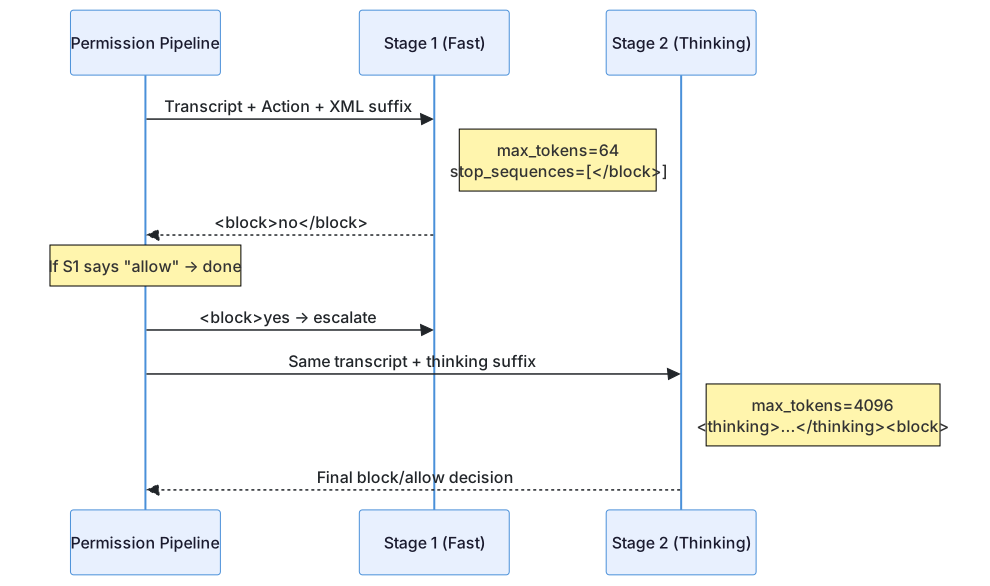
Stage 1 (Fast): Nudges an immediate <block>yes/no decision with 64 max tokens. If allowed → done.
Stage 2 (Thinking): Only runs when Stage 1 blocks. Uses chain-of-thought to reduce false positives. The suffix instructs: "Review the classification process... explicit user confirmation is required to override blocks."
Classifier Transcript Format
The classifier sees a compact transcript — not the full conversation:
{"user":"fix the login bug"}
{"Bash":"ls src/"}
{"Read":"src/auth.ts"}
{"Bash":"npm test"} ← This is the action being classifiedKey security: assistant text is excluded — only tool_use blocks are included. This prevents the model from crafting text that influences the classifier's decision.
Dangerous Permission Stripping
When entering auto mode, permissions that would bypass the classifier are stripped:
function isDangerousBashPermission(toolName, ruleContent): boolean {
  // Bash (no content) → allows ALL commands
  // Bash(python:*) → allows arbitrary code execution
  // Bash(node:*), Bash(ruby:*), etc.
  // PowerShell(iex:*), PowerShell(Start-Process:*)
  // Agent (any allow rule) → bypasses sub-agent evaluation
}Stripped rules are stashed and restored when leaving auto mode.
5. Denial Tracking and Circuit Breakers
Consecutive Denial Limits
// 源码位置: src/utils/permissions/denialTracking.ts:5-10
export const DENIAL_LIMITS = {
  maxConsecutive: 3,   // 3 consecutive blocks → fall back to prompting
  maxTotal: 20,        // 20 total blocks per session → fall back
}When limits are exceeded:
- Interactive mode: Falls back to user prompting
- Headless mode: Throws
AbortError— session terminates
Classifier Fail Modes
| Scenario | tengu_iron_gate_closed = true | tengu_iron_gate_closed = false |
|---|---|---|
| API error | Deny (fail closed) | Fall back to prompting (fail open) |
| Transcript too long | Abort in headless; prompt in interactive | Same |
| Unparseable response | Treat as block | Same |
The "Iron Gate" Feature Flag
tengu_iron_gate_closed controls fail-closed vs. fail-open behavior when the classifier API is unavailable. Refreshed every 30 minutes:
const CLASSIFIER_FAIL_CLOSED_REFRESH_MS = 30 * 60 * 10006. Headless Agent Permissions
Background/async agents can't show permission prompts. The pipeline handles this:
if (appState.toolPermissionContext.shouldAvoidPermissionPrompts) {
  // 1. Run PermissionRequest hooks — give hooks a chance
  const hookDecision = await runPermissionRequestHooksForHeadlessAgent(...)
  if (hookDecision) return hookDecision

  // 2. No hook decision → auto-deny
  return { behavior: 'deny', message: AUTO_REJECT_MESSAGE(tool.name) }
}Hooks can allow (with optional input modifications), deny, or interrupt (abort the entire agent).
7. Sandbox Integration
The sandbox provides kernel-level enforcement that complements the application-level permission pipeline:
Auto-Allow with Sandbox
When autoAllowBashIfSandboxed is enabled:
- Bash commands that pass
shouldUseSandbox()check → auto-allow (skip ask rule) - The OS sandbox enforces filesystem and network restrictions
- Application-level checks become redundant for sandboxed operations
What the Sandbox Protects
| Protection | Implementation |
|---|---|
| Filesystem writes | denyWrite list (settings files, .claude/skills) |
| Filesystem reads | denyRead list (sensitive paths) |
| Network access | Domain allowlist from WebFetch rules |
| Bare git repo attack | Pre/post-command file scrubbing |
| Symlink following | O_NOFOLLOW on file operations |
| Settings escape | Unconditional deny on settings.json |
8. Complete Decision Flow

Transferable Design Patterns
The following patterns can be directly applied to other AI agent permission systems or security pipelines.
Pattern 1: Ordered Pipeline with Bypass-Immune Safety Checks
Scenario: Different rule sources need different override semantics. Practice: Structure permission evaluation as a strictly ordered pipeline where some steps are immune to all bypass modes. Claude Code application: Steps 1d-1g fire even in bypassPermissions mode.
Pattern 2: Classifier Sees Tools, Not Text
Scenario: An AI safety classifier might be influenced by the model's own persuasive output. Practice: Strip assistant text from the classifier's input transcript, including only structured tool_use blocks. Claude Code application: The YOLO classifier transcript excludes assistant text to prevent social-engineering attacks.
Pattern 3: Reversible Permission Stripping
Scenario: Entering a high-automation mode shouldn't permanently destroy manual permission rules. Practice: Stash stripped rules on mode entry, restore them on mode exit. Claude Code application: Dangerous Bash(*) rules are stashed when entering auto mode and restored when leaving.
Pattern 4: Denial Circuit Breakers
Scenario: A blocked action causes infinite retry loops. Practice: Track consecutive and total denials; exceed limits triggers fallback (human intervention or clean shutdown). Claude Code application: 3 consecutive or 20 total denials trigger mode fallback.
10. OAuth 2.0 Authentication Pipeline
Source coordinates: src/services/oauth/client.ts, src/auth/
The permission system's authority begins with identity verification. Claude Code supports two authentication paths:
Dual Authentication Paths
| Path | Method | Token Type |
|---|---|---|
| Console API Key | ANTHROPIC_API_KEY env var or config | Static key, no expiry management |
| Claude.ai OAuth | PKCE Authorization Code flow | JWT with refresh, 1h expiry |
PKCE Flow
User → buildAuthUrl(codeChallenge) → Browser opens authorization URL
Browser → Callback with auth code → exchangeCodeForToken(code, codeVerifier)
Token → SecureStorage (Keychain on macOS) → refreshToken on expiryKey security properties:
- PKCE (S256): Prevents authorization code interception — the
code_verifieris generated client-side and never sent to the authorization server until exchange - Token lifecycle: Access tokens expire at ~1h; refresh tokens are stored in SecureStorage and automatically refreshed before expiry
- Revocation handling: Expired/revoked tokens trigger re-authentication rather than silent failure
Token Refresh Scheduling
// Bridge sessions use a generation counter to prevent stale refresh races
export function createTokenRefreshScheduler({
  getAccessToken, onRefresh, label, refreshBufferMs = 5 * 60 * 1000,
}): { schedule, cancel, cancelAll } {
  // 1. Decode JWT payload → extract exp claim
  // 2. Schedule refresh 5 minutes before expiry
  // 3. Retry up to 3 times on failure
  // 4. Generation counter prevents concurrent doRefresh conflicts
}11. Settings Multi-Source Merge System
Source coordinates: src/utils/settings/settings.ts, src/utils/settings/constants.ts
The permission pipeline's rules come from a sophisticated five-layer settings system (detailed in Episode 16), but the permission-specific aspects deserve coverage here.
Permission Rule Loading
// Rules are loaded from ALL settings sources + runtime sources
const PERMISSION_RULE_SOURCES = [
  ...SETTING_SOURCES,  // user/project/local/flag/policy
  'cliArg',            // --allowed-tools, --disallowed-tools
  'command',           // Skill-injected rules
  'session',           // Runtime additions via permission dialog
]

// Each source provides deny/allow/ask arrays
// Denial rules from ANY source take absolute precedence
// Allow rules accumulate across all sourcesEnterprise Managed Permissions
Enterprise policy settings (policySettings) have a special property: they cannot be overridden by lower-priority sources. When a policy denies a tool, no amount of project or user settings can re-allow it:
// Policy deny rules are checked FIRST in the pipeline
// They cannot be bypassed, even by bypassPermissions mode
// This enables IT departments to enforce security boundariesThe disableBypassPermissionsMode Setting
Enterprise deployments can completely disable bypass mode:
permissions: {
  disableBypassPermissionsMode: 'disable',  // Removes the option entirely
  deny: [
    { tool: 'Bash', content: 'rm -rf:*' },  // Policy-level deny
  ]
}12. Secure Credential Storage
Source coordinates: src/utils/secureStorage/
OAuth tokens and API keys are stored through a platform-adaptive secure storage system:
Platform Adaptation Chain
macOS?
  ├─ Yes → createFallbackStorage(macOsKeychain, plainText)
  │         ├─ Try macOS Keychain (security CLI)
  │         └─ Fallback: plaintext if Keychain fails
└─ No → plainTextStorage (Linux/Windows)Stale-While-Error Strategy
The most important pattern for credential storage resilience:
// macOsKeychainStorage.ts
read(): SecureStorageData | null {
  if (Date.now() - prev.cachedAt < KEYCHAIN_CACHE_TTL_MS) {
    return prev.data  // Serve from cache
  }
  try {
    const result = execSyncWithDefaults_DEPRECATED(
      `security find-generic-password -a "${username}" -w -s "${storeName}"`
    )
    // Parse and cache result
  } catch {
    // CRITICAL: Don't return null on failure
    // Serve stale cached data instead
    if (prev.data !== null) {
      keychainCacheState.cache = { data: prev.data, cachedAt: Date.now() }
      return prev.data  // Stale but functional
    }
  }
}Without stale-while-error, a transient macOS Keychain Service restart would cause every in-flight request to fail with "Not logged in," forcing users to re-authenticate after a brief system hiccup.
The 4096-Byte stdin Limit
// macOS security command has an undocumented stdin limit
const SECURITY_STDIN_LINE_LIMIT = 4096 - 64  // 64B safety margin
// Exceeding this causes SILENT data truncation → credential corruption
// This forced the design choice to minimize stored credential sizeSummary
| Component | Lines | Role |
|---|---|---|
permissions.ts | 1,487 | Core pipeline: 7-step evaluation, mode transforms |
permissionSetup.ts | 1,533 | Mode initialization, dangerous permission detection |
yoloClassifier.ts | 1,496 | 2-stage XML classifier for auto mode |
PermissionMode.ts | 142 | 6 permission modes + config |
PermissionRule.ts | 41 | Rule type: {toolName, ruleContent?} |
denialTracking.ts | 46 | Circuit breakers: 3 consecutive / 20 total |
permissionRuleParser.ts | ~200 | Rule string ↔ structured value conversion |
permissionsLoader.ts | ~250 | Load rules from 7 settings sources |
shadowedRuleDetection.ts | ~250 | Detect rules that shadow/conflict |
sandbox-adapter.ts | 986 | OS sandbox: seatbelt / bubblewrap |
The permission pipeline is Claude Code's most architecturally sophisticated subsystem. Its seven-step evaluation order — with four bypass-immune safety checks — represents hard-won lessons about what happens when AI agents can execute arbitrary code. The addition of the YOLO classifier shows the system evolving from pure rule-matching toward AI-assisted security decisions, while maintaining deterministic guardrails as a safety net.
Previous: ← 06 — Bash Execution EngineNext: → 08 — Agent Swarms